

Winter Twitch Overlays & Halloween Stream Starter Packages — Vtuber Chairs, Animated Backgrounds & Easy Setup | Greatvtubers
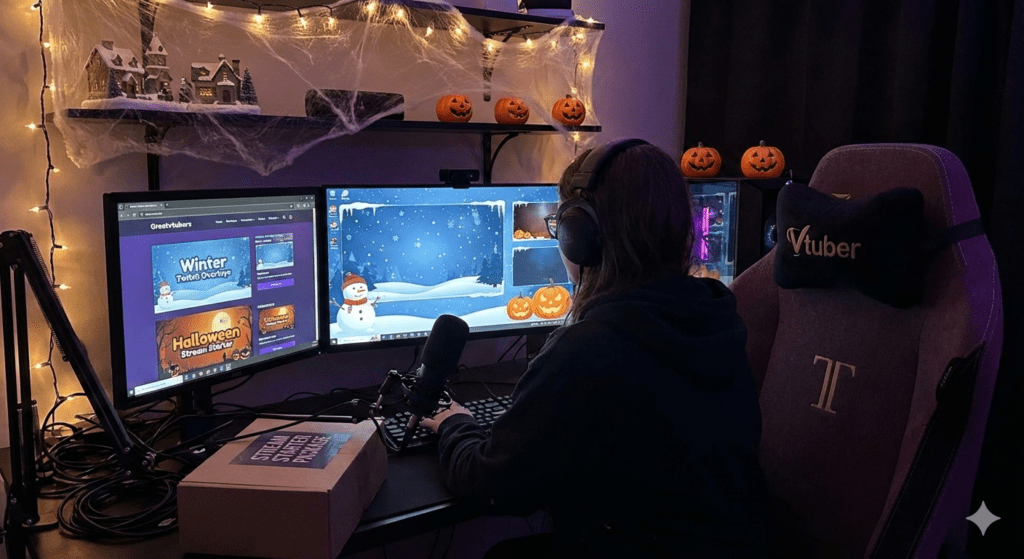
At Greatvtubers, we design stream assets that help creators look professional fast. Our Winter Twitch Starter Package and Halloween Stream Starter Package were built for VTubers and live streamers who want eye-catching seasonal visuals without complicated installs. Whether you stream on Twitch, Kick, or YouTube, these themed packs include animated winter stream overlays, vtuber winter background scenes, and ready-to-use vtuber chair PNG files so you can refresh your channel aesthetic in minutes and keep viewers engaged.
Why seasonal, themed overlays matter for Twitch & Kick streaming
Seasonal overlays aren’t just decoration — they’re attention drivers. A cohesive visual theme (like winter snow or spooky Halloween accents) improves click-throughs from socials and helps viewers instantly understand the tone of your stream. For VTubers, having an anchored element such as a Vtuber chair PNG or a themed background increases brand recognition and makes overlays feel like part of your channel identity rather than an afterthought.
Key benefits:
- Stronger first impressions on Twitch and Kick streaming directories
- Increased viewer retention with subtle animated elements (snow, particle motion)
- Faster channel growth when visuals match your content and promotions
What’s included in the Winter Twitch Starter Package
The Winter package was handcrafted for seasonal streams and VTuber setups. It contains everything you need to run a polished winter event on Twitch and Kick streaming.
Included assets:
- Animated winter stream overlays (browser-source animations + PNG/PSD layers) — soft falling snow, gentle vignette, animated lower-thirds.
- Vtuber chair PNG files in multiple styles and angles, all with transparent backgrounds for instant layering.
- High-resolution vtuber winter background scenes (multiple variations for menu/stream/gameplay scenes).
- Alert and transition packs optimized for low CPU usage (full + light versions).
- Step-by-step installation guide (OBS, Streamlabs, StreamElements).
Product : Buy Winter Twitch Starter Package
What’s included in the Halloween Stream Starter Package
The Halloween pack delivers spooky, themed overlays built to increase hype and encourage seasonal events.
Included assets:
- Animated overlays with subtle animations and themed alert designs (pulsing lanterns, drifting fog).
- Multiple vtuber chair PNG variants with props and transparent cutouts.
- High-resolution Halloween backgrounds and scene templates for intro, gameplay, and BRB scenes.
- Lightweight animation options for lower-end streaming rigs.
- Full install walkthrough and compatibility notes for OBS and Streamlabs.
Product : Buy Halloween Stream Starter Package
How these packs work with your setup (Twitch, OBS, Streamlabs & Kick)
Both packs were built to be platform-agnostic and optimized for live streaming:
- Import overlays as Image or Browser Source in OBS/Streamlabs.
- Use the included PSDs to customize text layers, color overlays, or remove elements you don’t need.
- Switch between animated and static scenes depending on your CPU/GPU usage to keep encoding stable.
- Works seamlessly for Twitch and Kick streaming, and also for YouTube live events.
If you want a single low-friction install, follow this quick setup:
- Download the ZIP for the pack you purchased.
- Extract folders: overlays, backgrounds, chairs, alerts, docs.
- In OBS: Add Browser Source (for animated overlays) or Image Source (for PNG).
- Layer Vtuber chair PNG above/below avatar as needed.
- Test alerts and transitions locally before going live.
Vtuber-specific features: chairs, backgrounds, and avatar compatibility
VTubers need assets that layer correctly and don’t interfere with avatar rigs. That’s why both packs include vtuber chair PNG files with transparent backgrounds and suggested placement guides. The vtuber winter background scenes are designed with proper safe zones so your avatar, chatbox, and alerts never overlap awkwardly.
Tips for VTubers:
- Place the chair PNG on a layer beneath your avatar, then add a subtle shadow layer for depth.
- Use the provided PSD to change chair colors to match your character palette.
- Keep an alternate static background ready for long scenes to reduce CPU usage.
Design choices that prioritize viewer experience and performance
Animated overlays are great — but only when balanced. Our animated winter stream overlays and Halloween animations were created to be elegant but not distracting. We offer both full animated files and light versions so streamers on less powerful machines can still use themed visuals without frame drops.
Performance notes:
- Full animated browser sources have richer motion; use on desktops with dedicated GPUs.
- Light versions use static PNGs and minimal animation to preserve encoding stability during long streams.
- Always test bitrate and CPU usage during a private recording before a live event.
Customization & branding — make the pack yours
Every streamer has a brand. We made sure labels, fonts, and color overlays are easy to change:
- Replace text layers with your handle and schedule (improves discoverability on Twitch).
- Recolor chair PNGs and overlays to align with your palette.
- Swap background variations depending on stream segment (intro, gameplay, intermission).
Pro tip: Match overlay color to your offline banner and panels for a consistent cross-platform brand presence.
Content ideas & use cases to maximize ROI
Seasonal overlays open doors for themed content that converts viewers into followers:
- Holiday marathon streams with themed overlays and special chat events.
- Themed giveaways promoted in your Twitch panels and socials.
- Collabs with other VTubers using matching seasonal overlays for brand synergy.
- Halloween horror game nights with spooky transitions and themed alerts.
Real Example: How a VTuber Increased Engagement
A VTuber used the Winter Twitch Starter Package during a five-day holiday marathon and saw a 12% increase in average watch time along with higher chat engagement. The combination of animated winter stream overlays and a vtuber winter background helped maintain visual interest during intermission and giveaway segments.
FAQ’s:
- What are winter twitch overlays and how do they improve my stream?
Winter twitch overlays are themed graphics and animated elements designed for seasonal streams. They improve first impressions, help your channel stand out on Twitch, and increase viewer retention when used with consistent branding. - Are the animated winter stream overlays and Halloween overlays compatible with OBS and Streamlabs?
Yes — both packs include browser-source animations and image/PSD files optimized for OBS, Streamlabs, and StreamElements. Light versions are included for lower-end systems. - How do I use the vtuber chair PNG files with my avatar?
Import the Vtuber chair PNG as an Image source in OBS and position it under or around your avatar layer. PNGs have transparent backgrounds for quick layering and customization. - Will these seasonal packs affect stream performance?
The packs offer both full and light variants. Full animated overlays add motion but are optimized for low CPU/GPU impact; use the light versions to preserve performance during long live streaming sessions. - Do these packs work for Twitch, Kick, and other platforms?
Absolutely — assets are platform-agnostic and built for Twitch and Kick streaming workflows, as well as YouTube live. Documentation includes platform-specific import tips.
No Comments