

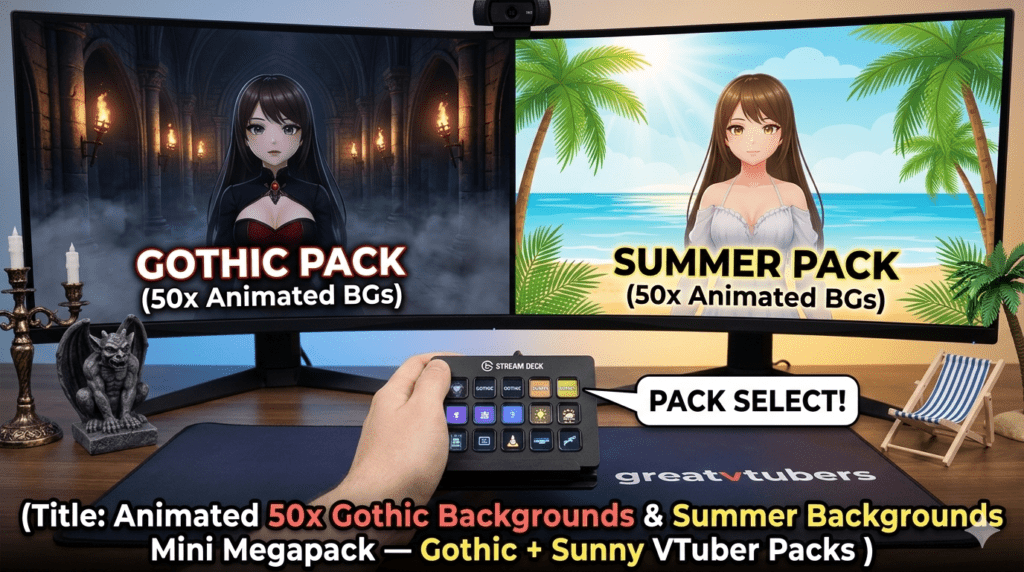
Animated 50x Gothic Backgrounds & Summer Backgrounds Mini Megapack — Gothic + Sunny VTuber Packs
Creating a striking stream identity comes down to atmosphere: whether it’s moody gothic halls or sunlit summer patios, the right VTuber background instantly sets tone and keeps viewers engaged. At Greatvtubers we design OBS-ready, loopable packs so creators can swap looks fast — from animated Twitch backgrounds for horror marathons to lightweight summer background megapacks for chill streams.
Animated 50x Gothic Backgrounds — 4x Twitch Animations & 2x Chairs
Why this pack works for gothic / horror VTubers
Dark aesthetics and animated foregrounds (fog, drifting crows, flicker) make horror content feel cinematic. Large themed packs like a 50x Gothic Backgrounds set let you rotate looks across a spooky season without repeating the same scene, which keeps viewers curious and thumbnails fresh. Market galleries and creatives regularly show demand for gothic/styled Twitch assets.
What’s included
- 50 loopable high-res Gothic backgrounds (1080p + cropped webcam variants)
- 4 foreground Twitch animations (ghost wisps, candle flicker, drifting fog, raven flight)
- 2 chair/prop elements (alpha/webm variants so avatars can “sit” in scene)
- Static PNG fallbacks and layered source files (PSD/AI) for edits
- Quick OBS install guide and low-res versions for weaker rigs
Benefits for your channel
- Deep immersion: animated foregrounds and props add dimensionality without green screens.
- Variety: rotate backgrounds to match horror games, storytelling, or spooky IRL events.
- Thumbnails & branding: moody palettes make clickable thumbnails that boost CTR.
OBS install tips (gothic):
- Add the background as a Media Source and enable loop; use .webm where available to reduce file size.
- Put foreground animations (sparks, fog) in separate Media Sources above the background so you can toggle them independently.
- Use alpha/webm chair files so your VTuber avatar can layer naturally “in scene.”
- Keep a low-res folder (720p) to swap in if you see frame drops during long streams.
Product link :
Explore Animated 50x Gothic Backgrounds on Greatvtubers here.
Summer Backgrounds Mini Megapack — Vtuber Chair Animations
Why this mini megapack is perfect for warm, chill streams
Summer packs give a bright, welcoming vibe ideal for IRL, chill gaming, art, or study streams. A Summer Backgrounds Mini Megapack with chair animations creates flexible sets — sunlit porches, shady gardens, beach patios — that pair well with pastel/lofi overlays and seasonal promos. Large summer packs and megapacks are commonly listed on marketplaces and shop pages, showing steady creator interest.
What’s included
- A curated set of high-resolution summer backgrounds (multiple crops: 16:9, square webcam)
- Animated VTuber chair elements (alpha/webm) so avatars can “sit” in scene naturally
- A selection of lighter animated accents (breeze leaves, floating pollen, soft lens flare)
- PNG fallbacks, editable source files, and a short OBS quick-start guide
Benefits for your channel
- Instant seasonal branding: summer visuals boost event-based promotion and themed streams.
- Flexible staging: chair animations create natural avatar placement without complex puppeteering.
- Low-friction setup: ready-to-import assets with scene presets speed launch time.
OBS install tips (summer):
- Use Media Source (loop enabled) for backgrounds and separate Media Sources for chair/foreground elements.
- If files include transparency, test CPU/GPU usage — some transparent formats cannot be hardware-decoded and may increase CPU usage; keep lower-res or lower-framerate fallbacks ready.
- Tick “Restart playback when source becomes active” to ensure clean loops on scene switches.
Product link :
View Summer Backgrounds Mini Megapack on Greatvtubers here.
How to choose: Gothic pack vs. Summer megapack (quick)
- Choose Animated 50x Gothic Backgrounds if you stream horror, storytime, or moody playthroughs and want layered animations and props.
- Choose Summer Backgrounds Mini Megapack if you want bright, rotating sets and avatar chair animations for casual, IRL, or seasonal streams.
FAQ’s:
Q1: Are these background packs compatible with OBS Studio?
A1: Yes — they include loopable webm/mp4 files and PNG fallbacks with a step-by-step OBS quick start. (Mention of specific OBS settings in install tips above.)
Q2: Do the chair animations support transparency so my VTuber avatar can appear “seated”?
A2: Yes — the packs include alpha or webm chair files to layer under/over your avatar scene, plus PSD/AI source files for edits.
Q3: Will using animated backgrounds hurt stream performance?
A3: Optimized webm files and careful scene organization minimize CPU/GPU load, but transparent video formats and high frame-rates can increase CPU usage — keep low-res fallbacks and test before long broadcasts.
Q4: How many crop/aspect options are included for webcam and gameplay scenes?
A4: Packs generally include 16:9 full scenes plus square/webcam crops and layered assets to fit common streaming layouts.
Q5: Can I edit colors, text, or swap elements in these packs?
A5: Most premium packs ship with layered PSD/AI/source files so you can recolor, add logos, or swap text — always check the product license for permitted edits.
No Comments